

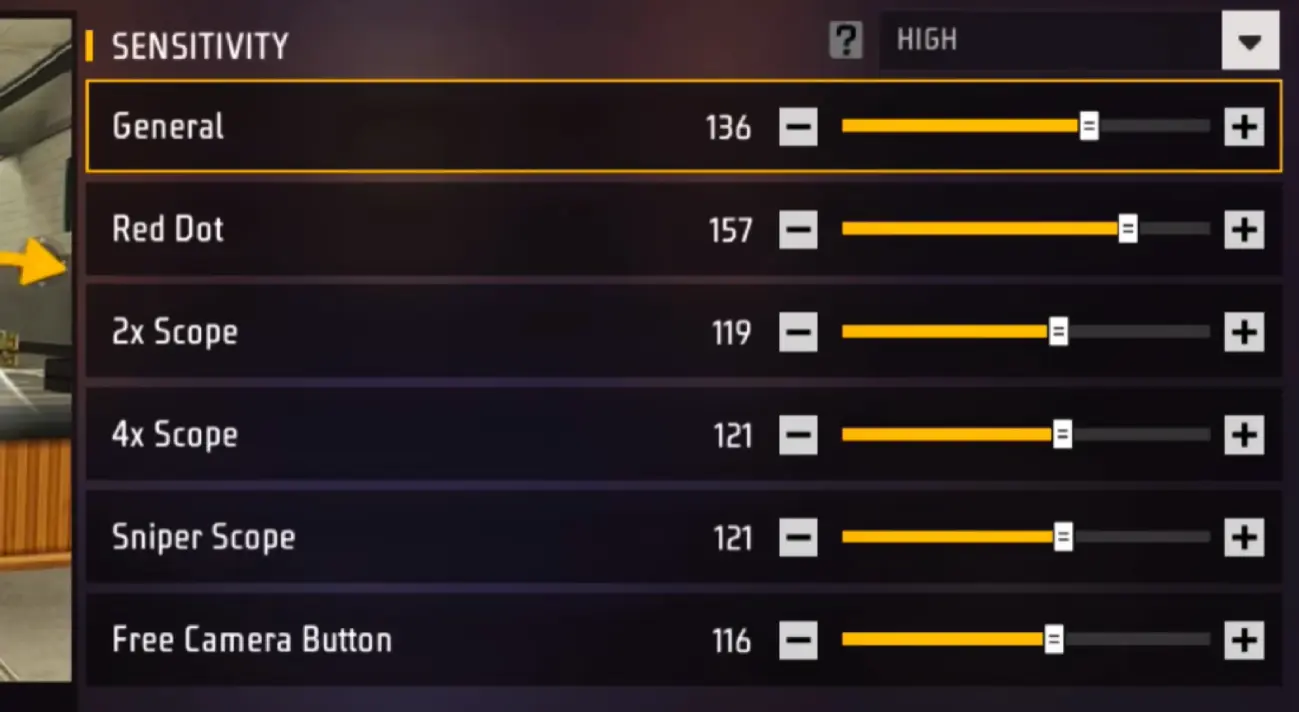
Finding the right Free Fire Sensitivity Settings can make a noticeable difference in how quickly you aim, track opponents, and control your crosshair during fights. However, there is no single sensitivity setup that works perfectly for every player. Your device, screen size, touch response, FPS stability, play style, and preferred weapons all affect how the settings feel.
In 2026, players can improve their aim by starting with a balanced sensitivity setup and then making small adjustments during practice matches. This guide explains the main sensitivity controls, recommended starting values, how each setting affects gameplay, and how to customize your setup for close-range combat, long-range shots, and more consistent headshots.
Table of Contents
- What Are Free Fire Sensitivity Settings?
- Recommended Sensitivity Settings for Free Fire in 2026
- What Each Sensitivity Setting Does
- Best Settings for Different Play Styles
- How to Adjust Sensitivity for Better Aim
- Sensitivity for Different Weapon Types
- Device Performance and Sensitivity
- Common Sensitivity Mistakes
- How to Test Your Settings
- Advanced Tips for Better Aim Control
- Frequently Asked Questions
- Conclusion
- Keyword Coverage Report
What Are Free Fire Sensitivity Settings?
Sensitivity controls determine how quickly your aim and camera respond when you move your finger across the screen. Higher sensitivity generally allows the crosshair to move faster, while lower sensitivity provides more controlled and gradual movement.
In Free Fire, sensitivity is particularly important because fights can change very quickly. A player may need to turn toward an opponent, track movement, adjust the crosshair vertically, and react to an enemy jumping or strafing within seconds.
The main sensitivity categories typically include:
- General
- Red Dot
- 2X Scope
- 4X Scope
- Sniper Scope
- Free Look
Each category affects a different type of camera or aiming movement. Rather than copying settings from another player without testing them, use a recommended configuration as a starting point and adapt it to your own device and mechanics.
Recommended Free Fire Sensitivity Settings for 2026
A balanced setup is useful for players who want a combination of quick movement and controlled aiming. The following values can serve as a starting point:
| Sensitivity | Recommended Starting Range |
|---|---|
| General | 90–100 |
| Red Dot | 85–95 |
| 2X Scope | 75–85 |
| 4X Scope | 65–75 |
| Sniper Scope | 45–60 |
| Free Look | 70–85 |
These values are not a universal formula. If your crosshair moves too quickly past the target, reduce the relevant sensitivity. If it feels slow when following an opponent, increase it gradually.
A good setup should feel responsive without making precise aiming difficult.
General Sensitivity
General sensitivity affects basic camera movement and is especially important during movement and close-range encounters.
A higher General value can help when quickly turning toward an opponent. Players who frequently engage at short distances may prefer a relatively high setting because fast camera movement can make it easier to react to enemies appearing from different directions.
However, extremely high sensitivity can make small adjustments harder. If your crosshair frequently moves beyond the target, lower the value slightly.
Red Dot Sensitivity
Red Dot sensitivity influences aiming when using a red-dot sight. It is important for short- and medium-range fights.
A starting range around 85–95 can provide a responsive feel without making the crosshair excessively difficult to control.
If you struggle to keep the crosshair on moving opponents, test small changes instead of immediately increasing the setting significantly.
2X Scope Sensitivity
The 2X scope is commonly useful for medium-range engagements. It requires a balance between movement speed and precision.
A range around 75–85 is a reasonable starting point. If your aim feels unstable while tracking distant moving targets, reduce the value slightly.
4X Scope Sensitivity
The 4X scope provides greater magnification, so excessive sensitivity can make precise adjustments more difficult.
Starting around 65–75 gives you room to make controlled movements. Players who mainly engage from longer distances may benefit from experimenting toward the lower end of this range.
Sniper Scope Sensitivity
Sniper aiming requires deliberate crosshair placement. A sensitivity around 45–60 can provide greater control when making small adjustments.
Players who already have precise finger control may prefer a somewhat higher value, while beginners may find a lower setting easier to manage.
Free Look Sensitivity
Free Look controls how quickly you can look around without necessarily changing your movement direction.
A setting around 70–85 can provide a useful balance between awareness and control. Players who frequently check their surroundings may prefer higher Free Look sensitivity.
What Each Sensitivity Setting Does
Understanding the purpose of each setting is more useful than memorizing numbers.
General
General sensitivity primarily affects ordinary camera movement. It has a strong influence on how quickly you can turn and reposition your view.
It is particularly noticeable during close-range encounters where rapid camera movement is required.
Red Dot
Red Dot sensitivity affects aiming with a red-dot sight. It can influence how easily you track opponents and make quick vertical or horizontal adjustments.
2X Scope
2X sensitivity becomes more important as the engagement distance increases. It should allow smooth tracking without causing excessive crosshair movement.
4X Scope
The 4X setting is designed for more controlled aiming at greater distances. Precision generally becomes more important than rapid movement.
Sniper Scope
Sniper sensitivity affects highly magnified aiming. Small finger movements can produce noticeable changes, so finding a comfortable value is important.
Free Look
Free Look allows players to observe their surroundings while maintaining awareness of nearby threats. It is useful for checking areas around the character without constantly changing the primary direction.
Best Sensitivity for Different Play Styles
Your preferred play style should influence your sensitivity rather than the other way around.
Aggressive Close-Range Players
Players who frequently rush opponents may prefer higher General and Red Dot sensitivity.
The goal is fast camera movement and quick target acquisition. A responsive setup can make it easier to react when an opponent suddenly changes direction.
However, high sensitivity does not automatically produce better headshots. Crosshair placement, movement, timing, and practice remain important.
Balanced Players
A balanced configuration works well for players who participate in both close- and medium-range fights.
A moderate-to-high General value combined with slightly lower scoped sensitivities can provide a versatile setup.
Long-Range Players
Players who prefer distance-based engagements may benefit from more controlled scope sensitivity.
Lower 4X and Sniper values can make small adjustments easier, particularly when trying to keep the crosshair steady on a distant target.
How to Adjust Sensitivity for Better Aim
Changing every value at once makes it difficult to determine what actually improved your gameplay.
Instead, use a gradual testing process.
Start With One Setting
Choose the setting that causes the biggest problem.
For example, if your close-range camera feels slow, adjust General sensitivity first. If scoped aiming feels unstable, change the relevant scope setting instead.
Make Small Changes
Increase or decrease the value by a small amount rather than making a dramatic change.
This lets you identify your preferred range without completely changing your muscle memory.
Test Against Moving Targets
Static targets do not provide enough information about tracking performance.
Practice against moving opponents or targets and observe whether your crosshair stays aligned as they change direction.
Test Both Horizontal and Vertical Movement
Sensitivity can feel different when moving the crosshair horizontally compared with making vertical adjustments.
Your setup should allow you to make both movements without excessive correction.
Sensitivity for Different Weapon Types
Different weapons can expose weaknesses in your sensitivity configuration.
Shotguns
Shotguns are commonly used during close-range fights, where fast reactions and camera movement are important.
A responsive General and Red Dot configuration can help, but aim placement and movement remain more important than simply increasing sensitivity.
Assault Rifles
Assault rifles can be used across different distances. A balanced sensitivity setup is generally more practical because you may need both quick target acquisition and controlled tracking.
SMGs
SMGs are often associated with close-range engagements. Players using them may prefer faster camera movement to keep up with nearby opponents.
Sniper Rifles
Sniper rifles require precision. Lower scope sensitivity can make small crosshair adjustments easier, especially at longer distances.
Device Performance and Sensitivity
Sensitivity does not operate independently from device performance.
A high-end device with stable frame rates can feel considerably different from a lower-end phone, even when both use exactly the same sensitivity values.
Factors that can affect your experience include:
- Screen size
- Touch response
- Frame rate stability
- Device refresh rate
- Performance during intense fights
- Touch sampling behavior
- Background applications
- Finger control and grip
If the game is experiencing frame drops, changing sensitivity may not solve the underlying problem.
For better consistency, close unnecessary background applications, maintain stable performance, and avoid making major sensitivity changes while your device is experiencing performance problems.
Common Sensitivity Mistakes
One of the biggest mistakes is copying another player’s settings without considering the differences between devices and play styles.
Changing Settings Too Frequently
If you change your sensitivity after every match, you never give your muscle memory enough time to adapt.
Choose a configuration and test it consistently before making another adjustment.
Using Extremely High Sensitivity
High sensitivity can make camera movement fast, but speed alone does not equal accuracy.
If your crosshair constantly passes the target, reduce the setting.
Ignoring Scope-Specific Settings
Some players focus only on General sensitivity. However, scoped aiming can behave differently, so each relevant category should be tested separately.
Blaming Sensitivity for Every Aim Problem
Poor aim can also result from bad crosshair placement, inconsistent movement, device performance, or insufficient practice.
Sensitivity should support your mechanics rather than replace them.
How to Test Your Settings
A structured testing routine is more reliable than repeatedly changing numbers after random matches.
Start with the recommended ranges and play several practice rounds. Pay attention to three things: how quickly the crosshair reaches a target, how easily you can track moving opponents, and whether small adjustments remain controllable.
If the crosshair consistently overshoots your target, lower the relevant sensitivity. If you cannot move quickly enough to follow an opponent, increase it slightly.
After finding a comfortable range, keep the settings unchanged for several sessions. This gives your muscle memory time to adapt.
Advanced Tips for Better Aim Control
Sensitivity is only one part of accurate gameplay.
Improve Crosshair Placement
Keeping the crosshair near the expected enemy position reduces the amount of movement required when an opponent appears.
Good crosshair placement can make a moderate sensitivity setting feel more effective than simply increasing sensitivity.
Develop Consistent Finger Movement
Avoid relying entirely on fast swipes. Controlled finger movement makes it easier to repeat successful aiming patterns.
Separate Aim Problems From Movement Problems
If your aim is accurate while stationary but becomes inconsistent while moving, the issue may involve movement coordination rather than sensitivity alone.
Practice combining movement and aiming instead of changing your sensitivity immediately.
Keep Your Setup Consistent
Once you find a configuration that feels comfortable, avoid changing it unnecessarily.
Consistency allows your hands to build muscle memory, making aiming more predictable over time.
Adjust for Your Own Device
Two players can use identical settings and receive different results because their screens, touch response, performance, and physical control are different.
Your final configuration should therefore be based on your own testing.
Frequently Asked Questions
What are the best Free Fire Sensitivity Settings in 2026?
A useful starting point is General 90–100, Red Dot 85–95, 2X 75–85, 4X 65–75, Sniper 45–60, and Free Look 70–85. These values should be adjusted according to your device and play style.
Does high sensitivity improve headshots?
High sensitivity can make quick crosshair movement easier, but it does not guarantee headshots. Accuracy also depends on crosshair placement, movement, timing, and practice.
Should beginners use high or low sensitivity?
Beginners should start with balanced values rather than immediately choosing extremely high or low sensitivity. This makes it easier to understand how each adjustment affects aiming.
Should sensitivity be different for every device?
It can be. Screen size, touch response, refresh rate, frame stability, and personal control can all change how a particular sensitivity setting feels.
What sensitivity is useful for close-range fights?
Higher General and Red Dot sensitivity can provide faster camera movement for close-range encounters. The exact value depends on how comfortably you can control the crosshair.
What sensitivity is better for sniper aiming?
A moderate or lower Sniper sensitivity can provide greater control for precise long-range adjustments. Players should test different values to find a comfortable range.
Can sensitivity fix bad aim?
Not completely. Sensitivity can improve responsiveness and control, but aiming skill also depends on practice, crosshair placement, movement, reaction time, and game awareness.
How often should I change my sensitivity?
Avoid changing it constantly. Test a configuration for multiple sessions and make small adjustments only when you identify a specific problem.
Is the same sensitivity good for every Free Fire player?
No. Sensitivity is highly personal. A configuration that works well for one player may feel too fast or too slow for another.
What should I do if my crosshair moves too fast?
Lower the relevant sensitivity slightly and test it again. Start with the setting associated with the type of aiming that feels uncontrolled.
Conclusion
The right Free Fire Sensitivity Settings should give you enough speed to react quickly while maintaining precise control over your crosshair. A balanced starting configuration can help you identify what works, but your final settings should be based on your device, play style, preferred weapons, and personal finger control.
Instead of chasing a universal sensitivity code or constantly copying other players, make small adjustments and test them consistently. Combined with good crosshair placement, movement practice, stable device performance, and regular gameplay, a properly tuned sensitivity setup can make aiming more comfortable and predictable in Free Fire.
